












Wild Fortune Casino — Mobile App for iOS & Android
Wild Fortune Casino Mobile Experience: Browser-Based Play Without an App Download
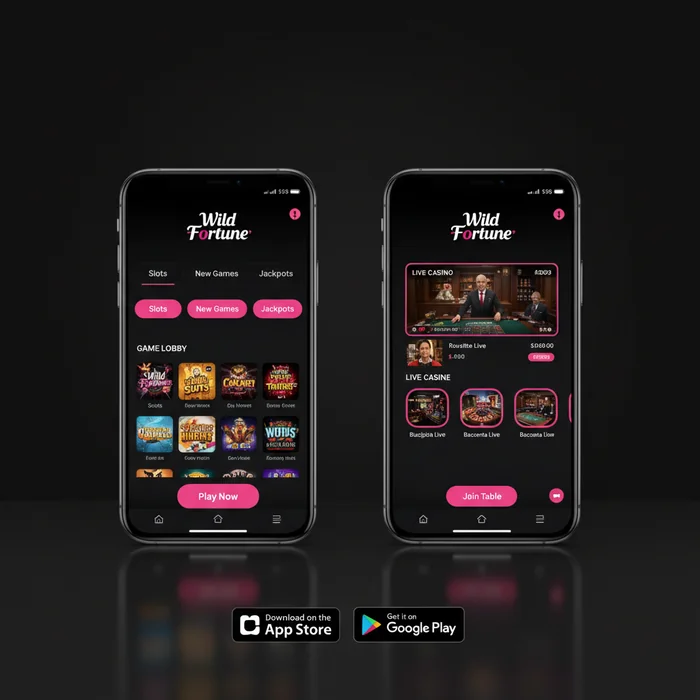
Are you looking to carry your full casino account in your pocket without filling up your phone's storage? The Wild Fortune Casino mobile platform is built entirely around instant browser-based play — no dedicated app file to download, no App Store approval delays, and no version compatibility headaches. Every feature available on desktop is accessible the moment you open your mobile browser and navigate to the site.
This approach is a deliberate design decision, not a limitation. By operating through the browser, we ensure that every update to the platform — new games, revised bonus terms, fresh VIP tier rewards — reaches your device immediately. Our VIP members in particular benefit from this: your loyalty points balance, tier status, and personal account manager contact details are always current, without waiting for an app update to push through.
How the Instant-Play Mobile Platform Works on iOS and Android
When you visit Wild Fortune Casino through your mobile browser, the site detects your device type and screen resolution automatically, then loads a touch-optimised interface. There is no separate mobile version to navigate to — the responsive layout adjusts in real time. Tap-to-spin controls, swipe-based navigation through game lobbies, and a condensed menu structure all activate as standard on both iOS and Android devices.
For our VIP players, the mobile session retains your full account context. Your current loyalty tier, accumulated points, and any active bonus wagering progress are displayed in the account dashboard exactly as they appear on desktop. If you have a dedicated account manager assigned at the Gold tier or above, their live chat contact remains accessible through the support icon in the mobile menu — no separate login or app required.
Session continuity is handled through secure browser cookies. If you close the tab and return within a standard session window, your game state and balance are preserved. This matters particularly during live dealer sessions, where interruption can affect active bets.
Supported Browsers and Minimum Device Requirements
| Platform | Recommended Browser | Minimum OS Version | Access Method |
|---|---|---|---|
| iPhone / iPad (iOS) | Safari 15+, Chrome 110+ | iOS 14 or later | Browser — no download |
| Android Phone / Tablet | Chrome 110+, Firefox 115+ | Android 9.0 or later | Browser — no download |
| Windows Mobile / Surface | Edge 110+, Chrome 110+ | Windows 10 Mobile | Browser — no download |
| Any Modern Tablet | Safari, Chrome, Firefox | OS released 2020 or later | Browser — no download |
Devices running operating systems older than those listed above may experience degraded performance on live dealer streams, which require stable WebRTC support. We recommend keeping your browser updated to its latest version regardless of device — this is the single most effective step for maintaining smooth gameplay.
Mobile Game Selection: Accessing All 7,500 Titles From Your Phone
One of the most common concerns players raise about mobile casino play is whether the game library is reduced compared to desktop. On our platform, that concern does not apply. All 7,500 titles in the Wild Fortune Casino library are accessible through the mobile browser, including the full live dealer suite, every slot category, and all table game variants.
The mobile lobby is organised identically to the desktop version: slots, live casino, table games, and jackpot titles each have their own filtered section. Search functionality works via the mobile keyboard, and the recently played and favourites lists carry over from your desktop sessions automatically. For VIP members who have curated a personal favourites list, that list is fully synchronised across devices.
Slots and Live Dealer Games Optimised for Small Screens
Game providers on the platform — including Pragmatic Play, Evolution, and NetEnt among others — supply mobile-optimised versions of their titles as standard. Slot reels render at full resolution on screens as small as 5 inches, with bet controls repositioned to the lower portion of the screen for thumb-reach accessibility. Autoplay and turbo-spin settings remain available on mobile, which is relevant for players working through bonus wagering requirements efficiently.
Live dealer tables from Evolution are streamed in adaptive bitrate video, meaning the stream quality adjusts to your available bandwidth rather than dropping the connection entirely. On a stable 4G or Wi-Fi connection, live blackjack, roulette, and baccarat tables load within 3 to 5 seconds and maintain consistent frame rates throughout the session. VIP-exclusive live tables — available to players at the higher loyalty tiers — are equally accessible on mobile, with the same dealer interaction and side-bet options as desktop.
Three titles that perform particularly well on mobile screens are Gates of Olympus (Pragmatic Play), Sweet Bonanza (Pragmatic Play), and Crazy Time (Evolution). Each is designed with portrait-mode play in mind and requires no horizontal scrolling or interface compromise on standard smartphone screens.
Touch Controls and Interface Layout on Mobile Devices
The touch interface on Wild Fortune Casino mobile is calibrated for single-handed play where possible. Spin buttons, bet adjustment arrows, and the cashier icon are all positioned within the lower two-thirds of the screen — the natural thumb zone on a standard smartphone. Pinch-to-zoom is disabled within game windows to prevent accidental interface disruption during play.
For live casino tables, the betting grid is rendered as a scaled-down but fully tappable layout. Chip denomination selection uses a horizontal scroll strip rather than a dropdown, which reduces the number of taps required per betting round. Players who find the default chip sizes too small can switch to a simplified betting view available in the table settings menu.
Depositing and Withdrawing via Mobile: Bitcoin, USDT, and Card Payments
Managing your bankroll through a mobile browser requires the cashier to be as functional as its desktop counterpart. On our platform, the full range of deposit and withdrawal methods — Bitcoin, Ethereum, USDT, bank transfer, and credit/debit cards — is available without restriction on mobile. No methods are removed or hidden behind a desktop-only interface.
One honest limitation worth noting: bank transfer withdrawals initiated on mobile may require additional verification steps if your device has not been previously registered with our security system. First-time mobile withdrawals above a certain threshold trigger an SMS or email confirmation step, which adds approximately 2 to 5 minutes to the initiation process. This is a security measure, not a processing delay.
How to Send a Crypto Deposit From a Mobile Wallet App
For players using Bitcoin, Ethereum, or USDT, the mobile deposit process integrates directly with wallet apps installed on the same device. In the Wild Fortune Casino cashier, select your preferred cryptocurrency, choose your deposit amount, and the platform generates a wallet address with a corresponding QR code. Open your wallet app — Coinbase, Trust Wallet, or any compatible wallet — and use the scan-to-pay function to read the QR code directly from your browser screen.
Crypto deposits are typically confirmed on-chain within 10 to 30 minutes depending on network congestion, which is consistent with industry-standard blockchain processing times. Once confirmed, funds appear in your account balance immediately and are available for play or withdrawal without additional holding periods. There are no platform-side fees on crypto deposits, though your wallet provider's standard network fee applies.
For our VIP members at the Platinum tier and above, crypto withdrawal limits are elevated above the standard thresholds. If you are approaching a tier upgrade and plan a larger withdrawal, it is worth confirming your current tier limits with your account manager before initiating the request — this avoids a split withdrawal across multiple transactions.
Processing Withdrawal Requests Through the Mobile Browser
Withdrawal requests submitted through the mobile browser follow the same processing pipeline as desktop submissions. Crypto withdrawals — Bitcoin, Ethereum, USDT — are often processed within hours of request submission, which is faster than the industry average of 24 to 48 hours for standard e-wallet withdrawals at comparable platforms. Bank transfer withdrawals operate on a longer timeline, typically 3 to 5 business days, which is standard for wire-based methods globally.
The withdrawal form on mobile is a single-page layout: select method, enter amount, confirm destination address or account details, and submit. There is no multi-page wizard that risks session timeout mid-process. Pending withdrawal requests can be reviewed and cancelled (if not yet processed) through the transaction history section of your mobile account dashboard.
| Payment Method | Deposit on Mobile | Withdrawal on Mobile | Typical Processing Time |
|---|---|---|---|
| Bitcoin | Yes — QR code supported | Yes | Often within hours |
| Ethereum | Yes — QR code supported | Yes | Often within hours |
| USDT (TRC-20 / ERC-20) | Yes — QR code supported | Yes | Often within hours |
| Credit / Debit Card | Yes — full form available | Yes | 3–5 business days |
| Bank Transfer | Yes — with verification step | Yes | 3–5 business days |
Mobile Performance, Speed, and Connection Stability Tips
Browser-based mobile play is only as reliable as the connection and device resources behind it. Understanding where performance bottlenecks typically occur — and how to address them before they interrupt a live dealer session or a bonus-active slot run — is practical knowledge every regular mobile player should have.
The Wild Fortune Casino mobile platform is optimised for low-latency loading: the game lobby typically renders within 2 to 4 seconds on a standard 4G connection. Individual slot games load in 3 to 6 seconds. Live dealer streams require more bandwidth — a minimum of 5 Mbps is recommended for stable HD video, and 10 Mbps or above for uninterrupted play during peak server hours.
Wi-Fi vs. Mobile Data: Which Delivers Better Live Casino Performance
For live dealer games specifically, a stable home Wi-Fi connection on a 5 GHz band consistently outperforms mobile data in terms of latency and stream stability. Mobile data connections — even on 5G networks — are subject to signal fluctuation, particularly in buildings, underground transport, or areas with high network congestion. A dropped frame during a live blackjack decision window is a minor inconvenience; a full stream disconnect during an active bet is a more significant disruption.
That said, for slot play and table games without live video streams, a reliable 4G LTE connection is entirely sufficient. Data consumption for standard slot sessions runs approximately 15 to 25 MB per hour — well within most mobile data plans. Live dealer sessions consume significantly more: expect 200 to 400 MB per hour at standard stream quality.
If you are a VIP member who plays live tables regularly on mobile, we recommend reserving live casino sessions for Wi-Fi environments and using mobile data for slot play, bonus wagering, and account management tasks. This is not a platform restriction — it is simply the practical reality of live video streaming on cellular networks.
Troubleshooting Slow Loading and Session Timeout Issues on Mobile
The most common cause of slow loading on the Wild Fortune Casino mobile site is an accumulated browser cache containing outdated asset files. Clearing your browser cache — in Safari: Settings → Safari → Clear History and Website Data; in Chrome: Settings → Privacy → Clear Browsing Data — resolves the majority of loading issues without requiring any action from our support team. This takes under 60 seconds and should be the first step before contacting live chat.
Session timeouts occur after a period of inactivity, which is a standard security measure across all licensed platforms operating under the Curaçao Gaming Control Board framework. If you are mid-session and step away from your device, re-authentication via your login credentials is required. For VIP members with two-factor authentication enabled, keep your authenticator app accessible — this adds one step to the re-login process but significantly strengthens account security.
If loading issues persist after cache clearing, our 24/7 live chat support team can diagnose session-specific issues using your account activity log. Response times through the mobile live chat interface are consistent with desktop — typically under 2 minutes during standard hours. VIP members at the Gold tier and above have access to a priority support channel with faster escalation for technical issues.
Ready to experience the full platform from your phone? Create your Wild Fortune account and access all 7,500 games, your loyalty dashboard, and the complete cashier from any mobile browser — no download required. If you already have an account, log in now and pick up exactly where you left off. Just as we asked at the start: why carry a separate app when the full Wild Fortune Casino experience is already in your browser?